IBM Vault 2.0 Launches with Redesigned User Interface and Enhanced Reporting Capabilities
IBM releases Vault 2.0 with UI overhaul, visual policy generator, onboarding wizard, and enhanced reporting to simplify secrets management adoption.
IBM Vault 2.0 Now Available: UI Overhaul and Improved Visibility Transform Secrets Management
ARMONK, NY — IBM today announced the release of IBM Vault 2.0, a major update that completely overhauls the user interface and adds comprehensive reporting and consumption visibility. The new version aims to eliminate the steep learning curve that has historically required users to become Vault experts through external documentation.
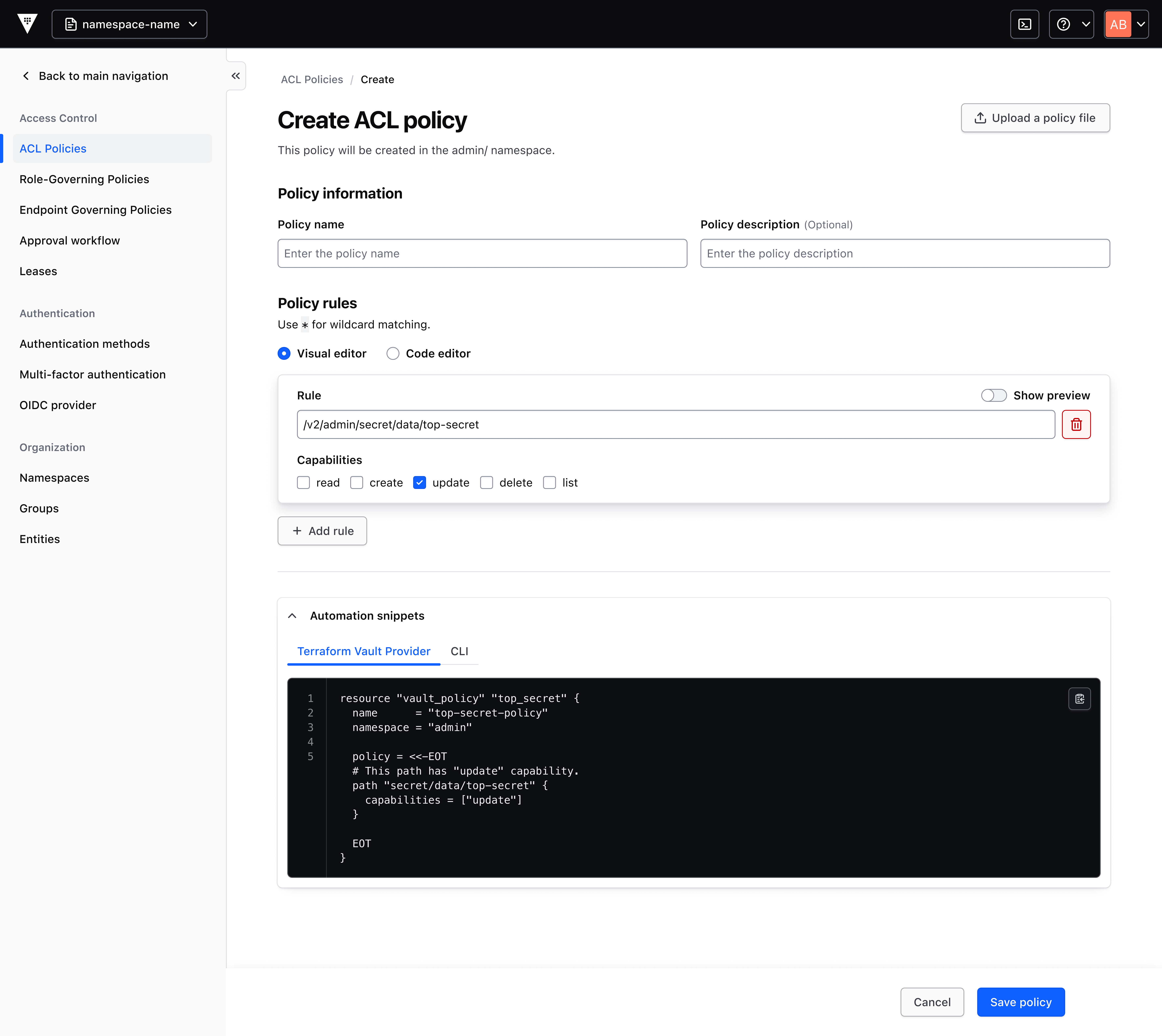
“We’ve taken a holistic look at Vault with a clear goal: make it easier to use so customers can onboard without needing a PhD in Vault,” said a Vault product manager at IBM. “Vault 2.0.1 includes improved reporting into consumption across secrets management, key lifecycle management, identity brokering, and data protection.”
Background: The Problem with Disparate Learning Resources
Previously, Vault users had to rely on developer docs, in-house videos, and community content to gain proficiency. This created a fragmented learning experience, with key knowledge scattered outside the product. The new release addresses that directly by contextualizing information within the UI.
The update focuses on two core pillars: helping customers easily discover new features and matching features intuitively to customer problems — rather than expecting them to be Vault documentation experts.
Key Features in IBM Vault 2.0
The following enhancements are designed to streamline onboarding and feature adoption:
- Visual Policy Generator — A pre-filled, contextual UI form that generates policy snippets. These snippets can be copied for use in the Terraform Vault Provider (recommended) or saved directly to the Vault cluster.
- Onboarding Wizard — Starts with simple questions about how a user plans to use a feature, then generates an editable code snippet to support that usage.
- Introductory Pages for New and Existing Features — Each page details the feature’s value and includes a recommended quick-start action.
- Navigation Bar Revamp — Groups features by customer problems, centering the user experience and contextualizing the best features for their tasks.
Visual Policy Generator: Removing the Code Barrier
New Vault users have zero permissions by default. Assigning permissions previously required writing custom policy code, creating an operational burden for admins and a barrier to feature adoption. The visual policy generator now auto-fills best-practice policies from simple forms, allowing users to generate editable policies without deep coding knowledge.
This tool significantly reduces the time and expertise needed to implement secure access controls, enabling faster deployment of Vault across the organization.
Onboarding Wizard: Guided Setup for Fast Adoption
The onboarding wizard asks users a few simple questions about their intended use cases — such as secrets management, key lifecycle management, or identity brokering — and then produces a ready-to-use code snippet. This eliminates the need to search through external docs for syntax and best practices.
“We want customers to quickly adopt features that strengthen their ability to deliver their own roadmaps,” the product manager added. “The wizard is a key part of that vision.”
Introductory Pages: Contextual Help at Every Step
Each feature now has its own introductory page that explains its value, provides helpful information, and recommends a quick-start action. This replaces context-switching to external resources and accelerates onboarding for new users and feature adoption for existing users.
Revamped Navigation Bar: Problem-Centered Design
The navigation bar has been redesigned to group features by common customer problems rather than technical categories. This intuitive layout helps users discover the right tools for their tasks without needing to understand Vault’s internal architecture first.
What This Means
For businesses, IBM Vault 2.0 lowers the barrier to entry for secrets management and related capabilities. The improved reporting provides greater transparency into usage patterns, enabling better forecasting, planning, and governance.
Organizations that previously required dedicated Vault specialists can now distribute responsibilities to broader DevOps teams. The updates support compliance initiatives and help optimize licensing costs through granular consumption visibility.
IBM expects these changes to accelerate adoption of Vault for secrets management, key lifecycle management, identity brokering, and data protection across enterprises of all sizes.